

You find the perfect job posting at 10 p.m. The deadline is tomorrow. You search for a free resume builder, spend 40 minutes filling in every section, pick a beautiful template, click Download, and a pop-up asks for your credit card. Sound familiar? Many tools that call themselves free only let you look at your resume, not keep it.
This guide to the best free resume builder options cuts through that. It explains which tools are genuinely free to download, how to choose a template that applicant tracking systems can read, a simple step-by-step method to write each section, ready-to-use bullet formulas and a checklist to run before you hit Apply.
Quick answer
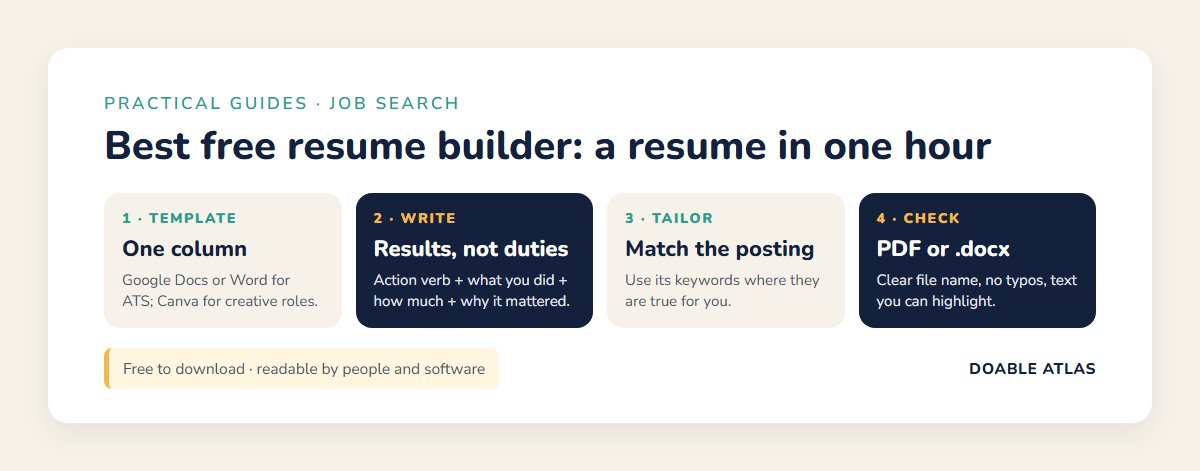
The best free resume builder for most people is the one that lets you download without paying: Google Docs or Microsoft Word templates for full control, Canva for design-heavy roles, and Indeed’s resume builder or LinkedIn’s resume feature for a fast start from information you already have. Choose a simple one-column template with standard headings, save as PDF or Word as the posting asks, and tailor the keywords to each job. Be wary of sites that charge only at the download step.
In this guide
What makes a resume builder truly free?
A resume builder is any tool that helps you lay out and format a resume, usually with templates and guided sections. “Free” can mean very different things, so check three things before you invest time:
- Free download. Can you download a PDF or Word file without a subscription or “trial” that renews automatically?
- No watermark. Some free plans stamp the tool’s logo on your resume.
- Editable later. Can you come back and update it for the next application without paying?
If a site hides the price until the end, or asks for a card for a “$1 trial,” read the cancellation terms carefully and set a reminder. Often, a plain document template gets you the same result for free.
The best free resume builder options compared
Features change often, so this table focuses on what each option is best at. Always confirm the current free plan on the tool’s own site.
| Tool | Free download? | Best for | Watch out for |
|---|---|---|---|
| Google Docs templates | Yes | Simple, clean resumes you can edit anywhere | Few templates; some use columns |
| Microsoft Word templates | Yes (Word or free Word on the web) | Employers who ask for a .docx file | Fancy templates with text boxes can confuse ATS |
| Canva | Yes, many templates | Creative and design roles, portfolios | Graphic layouts may not parse well in ATS |
| Indeed resume builder | Yes | Quick, guided resume tied to job applications | Basic design; profile visibility settings |
| LinkedIn resume feature | Yes | Turning an up-to-date profile into a resume | Only as good as your profile |
| “Free” online builders with paid downloads | Often no | Guided writing tips | Charges or auto-renewing trials at download |
Understand applicant tracking systems first
Many employers use applicant tracking systems (ATS) to store applications and search them by keyword. These systems read the text of your resume. If they cannot read it, a human may never see it. University career centers consistently advise keeping the layout simple: one column, standard section headings and no text boxes, tables, pictures or graphs for important information (University of Missouri–St. Louis Career Services; University of Pittsburgh Career Central).
That is why the best free resume builder for a corporate, government or healthcare job is often the plainest one. Save the eye-catching designs for situations where a person, not software, sees your resume first, such as handing it over at a career fair or emailing a hiring manager directly.
ATS-friendly template checklist
- One column, top to bottom.
- Standard headings: Summary, Experience, Education, Skills, Certifications.
- Common fonts such as Calibri, Arial or Georgia at 10–12 points.
- Contact details in the main body, not only in the header or footer.
- No photos, icons, charts or skill “bars.”
- Dates in a consistent format, such as “Mar 2023 – Present.”
How to build your resume with a free template: step by step
This method works in Google Docs, Word or any free resume builder. Set aside one focused hour for your first version.
- Collect your raw material (10 minutes). List every job, volunteer role, school program and certification with dates. Pull up old performance reviews, thank-you emails or project notes; they are full of accomplishments you forgot.
- Pick a simple template (5 minutes). In Google Docs, go to the template gallery and choose a resume with one column. In Word, search “resume” in new document templates and avoid ones built from text boxes.
- Write your header (2 minutes). Name, city and state, phone, a professional email and a LinkedIn link if you have one. A full street address is no longer expected.
- Write a 2–3 line summary (10 minutes). Who you are, your strongest skills and what you want next.
- Add experience with achievement bullets (25 minutes). Three to five bullets per recent role, starting with action verbs and showing results.
- Add education, skills and certifications (8 minutes). List hard skills that match the jobs you want.
How to write a resume summary that gets read
Your summary is the first thing a recruiter sees, usually in a few seconds. Skip vague phrases such as “hard-working team player” and say something specific. A simple pattern works in any free resume builder: who you are + your strongest proof + what you want next.
- Retail to office: “Customer-focused retail supervisor with 5 years of scheduling, cash handling and team training experience. Known for calm problem-solving during peak seasons. Seeking an administrative coordinator role in a growing healthcare office.”
- Recent graduate: “Marketing graduate with hands-on social media experience from two internships and a campus club that grew its events attendance. Comfortable with Canva, Google Analytics and short-form video. Looking for an entry-level marketing assistant position.”
- Experienced professional: “Operations manager with 10+ years improving warehouse processes, safety and on-time delivery. Led teams of up to 25. Ready to bring lean process experience to a regional distribution role.”
Skills section: what to include
Split skills into hard skills, the tools and abilities you can prove, and a short line of soft skills only if you can back them up elsewhere. Hard skills are what applicant tracking systems search for most, so use the exact names from postings: “Microsoft Excel (pivot tables),” “QuickBooks,” “forklift certified,” “Spanish (conversational),” “Salesforce.” If a posting repeats a skill you genuinely have, it belongs here and in at least one bullet.
Keep the list relevant. Ten targeted skills beat thirty generic ones. Remove outdated items such as basic email or typing unless the role specifically asks for them.
Cover letters with the same free tools
Many applications still ask for a cover letter, and the same free resume builder approach works. In Google Docs or Word, create a letter with matching fonts and header so your application looks like a set. Keep it to three short paragraphs: why this role, what you bring with one or two concrete examples, and a friendly close. Tailor the first sentence to the company every time. An AI assistant can help you draft, but edit it until it sounds like you.
Common resume mistakes to avoid
- Listing duties instead of results. “Answered phones” tells less than “Handled 60+ calls daily.”
- Using a template that breaks ATS parsing. Columns, icons and text boxes can scramble your information.
- An unprofessional email address. Create a simple firstname.lastname address for job hunting.
- Too long or too short. One page for early careers, up to two for experienced professionals.
- Inconsistent dates and formatting. Small inconsistencies look careless.
- Paying for something free. Check the download terms of any free resume builder before you start.
Bullet formulas that make any resume stronger
Recruiters skim. Bullets that show results stand out. Try this formula: Action verb + what you did + how much or how well + why it mattered.
| Weak | Stronger |
|---|---|
| Responsible for customer service | Resolved 40+ customer calls a day, keeping satisfaction scores above team average |
| Helped with social media | Planned and posted weekly content that grew followers from 800 to 2,300 in six months |
| Did inventory | Reorganized stockroom and weekly counts, cutting out-of-stock items by about a third |
| Worked on a team project | Coordinated a five-person team to launch a new scheduling process two weeks early |
Only use numbers you can explain in an interview. Estimates are fine if you label them honestly (“about,” “roughly”).
Action verbs to borrow
Led, built, launched, reduced, improved, trained, organized, negotiated, resolved, designed, streamlined, delivered, coordinated, analyzed, increased.
Tailor your free resume builder template to each job in 10 minutes
Sending the same resume everywhere is the most common reason good candidates hear nothing. Tailoring does not mean rewriting. It means adjusting:
- Copy the job posting into a note and highlight the skills and tools it repeats.
- Make sure those exact words appear in your summary, skills and bullets, where they are true for you.
- Move your most relevant bullets to the top of each role.
- Save a copy with a clear name such as “Jane-Smith-Resume-Marketing-Coordinator.pdf.”
Career centers warn against stuffing skills you do not have just to get past an ATS. It might get you an interview, but it will not get you the job.
Using AI with the best free resume builder tools
A free AI assistant can be a useful writing partner: ask it to turn a duty into an achievement bullet, suggest action verbs, shorten your summary or compare your resume to a job posting and list missing keywords. Our plain-English guide to the best free AI tools explains how to prompt well.
Three rules keep it safe and honest. Remove personal details such as your phone number and address before pasting. Never let AI invent experience, titles, dates or numbers. And rewrite the final version in your own voice, because recruiters increasingly recognize generic AI phrasing.
PDF or Word: which format should you send?
Follow the job posting first. If it asks for a Word document, send .docx. If it does not say, a PDF keeps your formatting identical on every device and is widely accepted. Make sure the PDF is text-based, not a scanned image: you should be able to highlight the words with your cursor. Our guide to the best free PDF tools shows how to compress or combine files, and if an employer sends you a form to complete, see how to make and fill a fillable PDF.
Best free resume builder choices by situation
First job or student
Use Google Docs or Word. Lead with education, then projects, volunteer work, part-time jobs and skills. Class projects and clubs count when you describe what you did and achieved.
Career changer
Start with a short summary that connects your past experience to the new field, then a skills section that highlights transferable skills. A simple template keeps the focus on the story, not the design.
Returning after a break
Be brief and honest about the gap, for example “Career break for family caregiving, 2022–2024,” and list any courses, volunteering or freelance work from that time.
Creative roles
Canva or a designed template can help, but keep an ATS-friendly plain version too, and link to an online portfolio.
Skilled trades and hourly roles
Keep it to one page and put licenses, certifications and equipment you can operate near the top. Hiring managers for trade, warehouse, restaurant and healthcare support roles often scan for availability, reliability and safety records, so a short line such as “Available nights and weekends” or “Zero safety incidents in 3 years” can be more powerful than a long summary.
Stay safe while job hunting
Job scams target people who are eager to work. The Federal Trade Commission warns that legitimate employers do not charge fees to hire you and that offers involving depositing a check and sending part of the money back are scams (FTC: Job Scams). Keep your Social Security number off your resume, use a strong, unique password for job sites (our guide on how to create strong passwords helps) and be cautious about “recruiters” who move quickly to text messages and gift cards.
Free resume builder checklist before you apply
| Check | Done? |
|---|---|
| One or two pages, easy to skim | ☐ |
| Keywords from the posting appear naturally | ☐ |
| Every bullet starts with an action verb | ☐ |
| No typos (read it aloud or use text-to-speech) | ☐ |
| Contact details correct and clickable | ☐ |
| File named with your name and the role | ☐ |
| Text can be highlighted in the PDF | ☐ |
Quick quiz: is your resume ATS-ready?
1. Your name and phone number are only in the document header. Problem?
Possibly. Some systems skip headers and footers. Put contact details in the main body to be safe.
2. Is a two-column Canva design a good choice for a large company’s online application?
It is risky. Use a one-column version for online applications and keep the designed version for in-person or direct emails.
3. Should you add skills from the posting that you do not have?
No. Add the matching skills you genuinely have, in the posting’s wording.
Keep your job search organized
A tidy system makes applying less stressful. Keep a “Job Search” folder with your master resume, tailored versions and cover letters (see our guide to organizing digital files). Track applications and follow-up dates on a simple board from our best free task management apps list, put interviews on a calendar from our best free calendar apps guide and set up an email filter so replies from employers never get buried, as shown in how to manage email overload.
Free resume builder FAQ
Is Canva a good free resume builder?
Canva is great for visually polished resumes and many templates are free to download. For online applications at larger employers, use one of its simpler one-column templates or keep a plain version alongside the designed one.
Do I need a different resume for every job?
You need a tailored version, not a brand-new one. Keep a master resume and spend about 10 minutes adjusting keywords and bullet order for each posting.
How far back should my resume go?
Most people focus on the last 10 to 15 years. Older roles can be summarized in one line or left off unless they are directly relevant.
Should I include references?
No need. Employers will ask when they are ready. Have a separate list of two or three references prepared, and ask permission first.
Want more ways to simplify your digital life while job hunting? Our best free productivity tools guide and the digital declutter checklist help you clear space for what matters.
Glossary
- ATS (applicant tracking system): software employers use to store and search applications.
- Master resume: a long version with everything you have done, used to create tailored copies.
- Tailoring: adjusting your resume’s wording and order to match a specific posting.
- Achievement bullet: a line that shows a result, not just a duty.
The bottom line
You do not need to pay to get a professional resume. The best free resume builder is the one that lets you download a clean, readable file: a one-column Google Docs or Word template works for most jobs, Canva suits creative roles and Indeed or LinkedIn give you a quick start. Write achievement bullets, tailor keywords to each posting, check your file before you apply and protect yourself from job scams. Open a template tonight, and you could be applying tomorrow morning.