

AI is no longer something only programmers use. Free assistants such as ChatGPT, Google Gemini, Microsoft Copilot and Claude can now help you plan dinner, write a tricky email, compare products or explain a confusing letter in plain English. Yet many people try AI once, get a so-so answer and give up. The difference between “meh” and “wow” is usually not the tool. It is knowing what to ask and how to ask it.
This guide shows how to use AI in everyday life in practical, safe ways: 15 real tasks at home, at work and with money, copy-and-paste prompts for each, a simple formula for better answers, and the privacy and safety rules everyone should follow. You do not need any technical skills. If you can send a text message, you can use AI in everyday life starting today.
Quick answer
The easiest ways to use AI in everyday life are meal planning from what is in your fridge, writing and polishing emails, summarizing long documents, planning trips and weeks, comparing options before you buy, learning new skills step by step and organizing to-do lists. Give the AI context, a clear task and the format you want. Never paste passwords, account numbers or sensitive personal data, and always double-check facts, numbers and anything important.
In this guide
What AI in everyday life really means
When people talk about AI in everyday life today, they usually mean AI chat assistants: apps or websites where you type (or speak) a request in normal language and get a written answer back. These assistants are trained on huge amounts of text, which makes them very good at writing, summarizing, explaining, brainstorming and organizing information.
They also have limits. AI assistants can sound confident while being wrong, a problem often called “hallucination”. They may not know about very recent events unless they can search the web, and they do not know your personal situation unless you explain it. The smart way to use AI in everyday life is to treat it like a fast, helpful assistant whose work you still review, not like an all-knowing expert.
If you have not chosen a tool yet, our roundup of the best free AI tools compares the popular options and what each does well.
AI in everyday life you may already use
Even if you have never opened a chatbot, you probably rely on AI in everyday life already. Recognizing these features helps you use them on purpose:
- Email spam filters learn which messages are junk or phishing and keep most of them out of your inbox.
- Navigation apps predict traffic and suggest faster routes based on patterns from millions of trips.
- Phone keyboards suggest the next word, fix typos and offer quick replies.
- Photo apps let you search your gallery for “dog”, “beach” or “receipt” without any tags.
- Voice assistants set timers, add items to shopping lists and read messages aloud while you cook or drive.
- Streaming and shopping recommendations suggest shows and products based on what you watched or bought before.
Chat assistants simply take this one step further: instead of a hidden feature doing one job, you can ask for help with almost any writing, planning or thinking task in plain language.
The simple formula for better AI answers
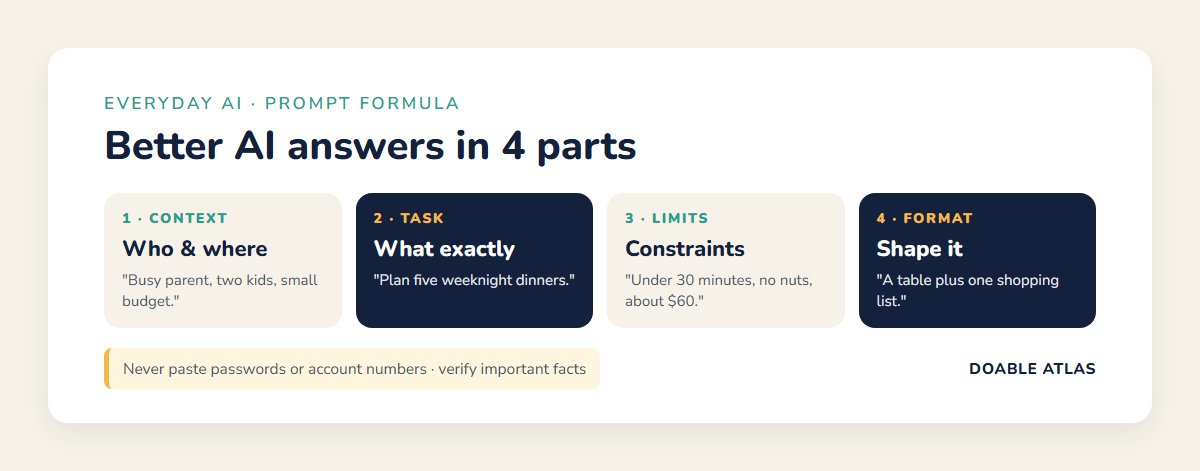
Most disappointing AI answers come from short, vague requests. Use this four-part formula and the quality jumps immediately:
- Context: who you are and what situation you are in. “I’m a busy parent of two kids, ages 6 and 9.”
- Task: exactly what you want. “Plan five weeknight dinners.”
- Constraints: limits that matter. “Under 30 minutes, no nuts, about $60 total.”
- Format: how you want the answer. “Give me a table plus one combined shopping list.”
Then keep the conversation going. Ask follow-ups such as “make it cheaper”, “explain step 3 more simply” or “give me two other options”. Refining the answer is where AI in everyday life becomes genuinely useful.
Follow-up prompts that improve any answer
Save these short follow-ups; they work with every assistant and every task:
- “Make it shorter and simpler.”
- “Give me three different options.”
- “What did you assume? Ask me questions before you answer.”
- “Turn this into a checklist I can print.”
- “Explain it like I’m new to this topic.”
- “What are the risks or downsides?”
- “Rewrite it in a warmer, more friendly tone.”
The “ask me questions first” follow-up is especially powerful. It makes the AI gather the details it needs, so the final answer fits your real situation instead of a generic one.
15 practical ways to use AI in everyday life
At home
1. Plan meals from what you already have
Tell the AI what is in your fridge and pantry and ask for quick recipes. This cuts waste and saves a grocery trip.
Prompt: “I have chicken thighs, rice, spinach, eggs, onions and canned tomatoes. Suggest three dinners under 30 minutes for two people, with step-by-step instructions.”
Pair it with our tips on how to save money on groceries and how to keep food fresh longer.
2. Build a weekly meal plan and shopping list
Prompt: “Create a 5-day vegetarian dinner plan for a family of four, budget about $75, and group the shopping list by store section.”
3. Make a cleaning or decluttering schedule
Prompt: “I have 20 minutes a day on weekdays. Make a weekly cleaning schedule for a two-bedroom apartment so nothing takes more than 20 minutes.”
Our guide on how to declutter your home fast gives you the steps to plug into that schedule.
4. Plan a trip or a family weekend
Paste in the messy group chat or your own notes and ask for a clean plan.
Prompt: “Here are our ideas for a 2-day weekend in the mountains for four adults. Make an itinerary with a budget per person and a list of who books what.”
5. Get help with homework explanations
AI can explain a math concept or a history topic in simpler words, which is great for parents helping kids. Ask it to explain, not to do the homework.
Prompt: “Explain how to divide fractions to a 10-year-old, with one example and one practice question. Don’t give the answer to the practice question.”
At work
6. Write and polish emails
This is one of the most popular uses of AI in everyday life. Draft your message, then ask the AI to improve tone and clarity.
Prompt: “Rewrite this email to be polite but firm, under 120 words: [paste your draft].”
For inbox overload, see how to manage email overload.
7. Summarize long documents and meeting notes
Prompt: “Summarize these meeting notes in five bullet points, then list action items with owners and deadlines: [paste notes].”
Remove names and confidential details first, and follow your employer’s rules about which AI tools you may use with work material.
8. Plan your week and prioritize tasks
Prompt: “Here is my to-do list and my calendar for next week. Help me pick the top three priorities and suggest time blocks for each.”
Combine this with our guides on how to plan your week and time blocking for beginners.
9. Prepare for a difficult conversation or interview
Prompt: “I need to ask my manager for a deadline extension. Help me plan what to say, and role-play my manager asking tough questions.”
10. Turn rough notes into clean documents
Paste bullet points and ask for a short report, a checklist or a step-by-step how-to. You stay the author; the AI handles structure and wording.
With money and shopping
11. Build a simple budget
Prompt: “My monthly take-home pay is $3,800. Rent is $1,400, car $350, utilities $200. Suggest a simple budget with categories and a savings target.”
Then put the numbers into a sheet using how to create a simple budget spreadsheet. Treat AI suggestions as a starting point, not personal financial advice.
12. Compare products before you buy
Prompt: “Compare robot vacuums under $300 for a home with pets and carpets. Make a table of features to check, and questions I should ask before buying.”
Always confirm current prices and specs on the seller’s site, and learn how to spot fake reviews before trusting star ratings.
13. Find subscriptions to cut
Type your recurring charges (without card numbers) and ask the AI to group them, total the yearly cost and flag overlaps, such as two music services or three streaming apps.
For learning and wellbeing
14. Learn a new skill step by step
Prompt: “Create a 4-week plan to learn basic Spanish for travel, 15 minutes a day, with a daily exercise and a weekly self-test.”
AI in everyday life works best as a patient tutor: ask it to quiz you, explain mistakes and adjust the difficulty.
15. Build better habits
Prompt: “I want to go to bed earlier. Suggest a simple 10-minute evening routine and a plan to move my bedtime 15 minutes earlier each week.”
Our guides on how to build better habits and the evening reset routine pair well with AI-generated plans. For health questions, AI is not a substitute for a doctor.
AI in everyday life: tasks and starter prompts
| Task | Starter prompt | Check before using |
|---|---|---|
| Dinner ideas | “I have X, Y, Z. 3 dinners under 30 min.” | Allergies, cooking temperatures |
| “Make this polite but firm, under 120 words.” | Names, dates, promises | |
| Summary | “Summarize in 5 bullets plus action items.” | Nothing important left out |
| Trip plan | “2-day itinerary with budget per person.” | Opening hours, prices |
| Shopping | “Compare options under $X in a table.” | Current specs and prices |
| Learning | “4-week plan, 15 minutes a day, quiz me.” | Facts against a trusted source |
How to stay safe with AI in everyday life
Protect your privacy
- Never paste passwords, Social Security numbers, bank or card numbers, medical record numbers or anything you would not want stored on someone else’s server.
- Anonymize documents before summarizing them: replace names with “Person A” and remove account details.
- Check the settings. Many AI apps let you turn off chat history or opt out of having your conversations used for training.
- Use strong, unique passwords and multi-factor authentication on your AI accounts too. A password manager for beginners makes this easy.
Double-check facts and numbers
AI can make up statistics, quotes, laws or sources that sound real. For anything important (money, health, legal or safety decisions), verify the answer with an official website or a qualified professional. Our guide to spotting weak evidence in viral stories teaches checks that work for AI answers too.
Watch out for AI-powered scams
Scammers use AI as well. The Federal Trade Commission warns that criminals can clone a loved one’s voice from a short audio clip found online and use it in fake emergency calls asking for money (FTC). The FTC’s advice is simple: do not trust the voice alone. Hang up and call the person back on a number you know, or check with another family member.
- Agree on a family code word that only real relatives know.
- Be suspicious of urgency, secrecy and requests for gift cards, wire transfers or crypto.
- Look closely at viral photos and videos. AI images often show odd hands, warped text or lighting that looks too perfect. A reverse image search can reveal where a picture really came from.
Keep your own judgment in charge
Use AI in everyday life to save time on drafts, ideas and organization, but make the final decisions yourself. If an answer feels off, ask “How sure are you?” or “What could be wrong with this?”, and look it up.
It also helps to notice how you feel after using AI. If a tool saves you time and leaves you with more energy for people and hobbies, it is working. If you find yourself asking it to make every small decision or scrolling through endless generated ideas, step back. The goal of AI in everyday life is to clear space in your day, not to fill it. Pick two or three tasks where it truly helps, and let the rest stay simple and human.
Common mistakes when using AI in everyday life
- Asking one-line questions. Add context, constraints and format.
- Accepting the first answer. Ask for options, simpler versions or corrections.
- Using AI for final facts. Use it for drafts and explanations, then verify.
- Sharing private data. Remove anything sensitive first.
- Letting AI replace thinking. The best results come when you guide, edit and decide.
A 7-day plan to start using AI in everyday life
| Day | Try this |
|---|---|
| Day 1 | Ask for three dinner ideas from what is in your fridge |
| Day 2 | Rewrite one email you have been putting off |
| Day 3 | Turn your to-do list into a prioritized plan for tomorrow |
| Day 4 | Summarize a long article or document (with private details removed) |
| Day 5 | Compare two products you are thinking of buying |
| Day 6 | Start a 15-minute learning plan on a skill you want |
| Day 7 | Set a family code word and review your AI app’s privacy settings |
AI in everyday life for different people
Parents
Use AI for meal plans, chore charts, birthday party checklists and kid-friendly explanations of homework topics. Teach children to verify facts and to never share personal details with chatbots.
Older adults
Voice assistants and chat apps can explain confusing letters, draft messages to family and walk through phone settings step by step. Learn about voice-cloning scams and set up a family code word together.
Students
Ask AI to quiz you, explain difficult topics in simpler words and create study schedules. Follow your school’s rules on AI use, and never submit AI-written work as your own when it is not allowed.
Busy professionals
Draft emails, summarize long threads, prepare meeting agendas and turn notes into action items. Check your company’s AI policy before pasting any work content. For a broader toolkit, see our list of the best free productivity tools.
Quick quiz: AI in everyday life
1. What four parts make a strong AI prompt?
Context, task, constraints and format.
2. What should you do if a relative calls in a panic asking for money?
Hang up and call them back on a number you know, or ask for your family code word. The FTC warns that voices can be cloned with AI.
3. True or false: it’s fine to paste your bank details into an AI chat.
False. Never share passwords, account numbers or other sensitive data with AI tools.
AI in everyday life FAQ
Is it safe to use AI in everyday life?
Yes, for most everyday tasks, as long as you avoid sharing sensitive personal information, double-check important facts and use reputable apps with strong passwords and multi-factor authentication.
Do I need to pay to use AI?
No. Most major assistants offer free versions that handle everyday tasks well. Paid plans usually add faster responses, newer models or extra features.
Can AI replace a doctor, lawyer or financial advisor?
No. AI can help you understand terms and prepare questions, but decisions about health, legal matters and money should involve a qualified professional.
What is the easiest first step with AI in everyday life?
Start with something low-stakes and useful, such as dinner ideas from your fridge or rewriting a short email. Once you see how it works, try bigger tasks like trip planning or budgeting.
The bottom line
Using AI in everyday life is less about technology and more about good questions. Give the assistant context, a clear task, limits and a format; keep refining; protect your private data; and verify anything important. Start with one small task today, maybe tonight’s dinner, and let AI in everyday life handle the busywork so you have more time for what matters.