

If your to-do list keeps growing while your calendar fills with meetings, errands, and interruptions, time blocking can bring the two together. Instead of hoping you will find time for important work, you decide in advance when it will happen and protect that time on your calendar.
This guide on time blocking for beginners explains what the method is, why it works, and how to set up your first week step by step. You will also find a sample schedule, common mistakes to avoid, and simple ways to adapt time blocking for a busy or unpredictable life.
In this guide
What is time blocking?
Time blocking is a planning method where you divide your day into blocks of time and assign each block a specific task or type of work. Rather than working from an open-ended to-do list, you give each important task a home on your calendar.
For example, instead of a list that says “write report, answer email, call dentist, plan meals,” your calendar might show:
- 9:00–10:30: Write report (draft sections 1 and 2)
- 10:30–11:00: Email and messages
- 12:30–12:45: Call dentist; quick errands
- 7:00–7:20 p.m.: Plan meals for the week
The difference is subtle but powerful. A to-do list tells you what to do. A time-blocked calendar also tells you when, and shows you whether everything actually fits.
Time blocking vs. related methods
- Task batching: Grouping similar small tasks, such as emails or phone calls, into one block. This is often used inside a time-blocked day.
- Day theming: Giving each day a focus, for example Monday for planning and Friday for admin. Useful for people with several roles.
- Timeboxing: Setting a fixed time limit for a task and stopping when it ends. Time blocks can be timeboxed, but not every block needs to be.
Why time blocking works
Time blocking helps for several reasons, and research on planning supports a few of them.
It exposes unrealistic plans
People consistently underestimate how long tasks will take, even when they know similar tasks ran late before. Psychologists call this the planning fallacy (Buehler, Griffin & Ross, 1994). A to-do list hides this problem. A calendar makes it visible: when you try to fit eight hours of tasks into a four-hour afternoon, the overflow is obvious before the day begins.
It quiets the mental to-do list
Unfinished tasks tend to keep pulling at our attention. In a series of experiments, researchers found that making a specific plan for an unfinished goal reduced those intrusive thoughts and helped people perform better on unrelated tasks (Masicampo & Baumeister, 2011). Putting a task in a time block is a simple version of that kind of plan. You no longer need to keep reminding yourself, because you know when it will happen.
It decides when before the moment arrives
Plans that specify when and where you will act tend to improve follow-through compared with vague intentions (Gollwitzer & Sheeran, 2006). A time block is exactly that: a decision about when, made in advance, so you do not have to rely on motivation in the moment.
It reduces task switching
By grouping similar work and protecting focus time, time blocking limits the constant switching that drains attention. If distractions are a major issue for you, our guide on how to focus without getting distracted pairs well with this method.
Time blocking for beginners: a step-by-step setup
You can set up your first time-blocked week in about 30 minutes. Use a paper planner, a digital calendar, or a simple printed grid; the tool matters much less than the habit.
Step 1: List what actually needs to happen this week
Write down everything you need or want to do this week: work projects, appointments, errands, exercise, family commitments, and personal goals. Do not organize yet. The point is to get everything out of your head.
Step 2: Add your fixed commitments first
Put anything with a fixed time on your calendar: meetings, school pickup, appointments, classes, and regular commitments. These are the boundaries around which everything else fits.
Step 3: Choose your top three priorities
From your list, choose the three most important tasks for the week. These are the tasks that would make the week feel successful if you completed them. If you are not sure what matters most, our guide on how to set achievable goals can help you connect weekly tasks to bigger goals.
Step 4: Block focus time for priorities
Give each priority a block during your best energy hours. For many people, that is the morning; for others, it is late afternoon. Make the block specific: “Draft the budget proposal,” not “Work on budget.”
Beginners usually do best with blocks of 60 to 90 minutes for focused work. Longer blocks are harder to protect and easier to abandon.
Step 5: Batch small tasks into admin blocks
Group email, messages, quick calls, and paperwork into one or two short admin blocks each day, for example 30 minutes late morning and 30 minutes late afternoon. This keeps small tasks from interrupting your focus blocks.
Step 6: Add buffers and breaks
This is where most beginners go wrong. A schedule packed from 8:00 to 6:00 with no gaps will break by 10:00. Leave 10 to 15 minutes between blocks, and plan at least one larger buffer block each day for tasks that run over or unexpected requests.
Because of the planning fallacy, a practical rule is to estimate how long a task will take, then add 25 to 50 percent.
Step 7: Review each evening and adjust
Take five minutes at the end of each day to check what happened. Move anything unfinished to a new block, and adjust tomorrow’s plan to reality. Time blocking is a living plan, not a rigid rulebook. A short evening reset is a natural place for this review.
A sample time-blocked day
Here is an example of a realistic weekday for someone who works full time. The summary card below shows the same structure as a template you can save and adapt.
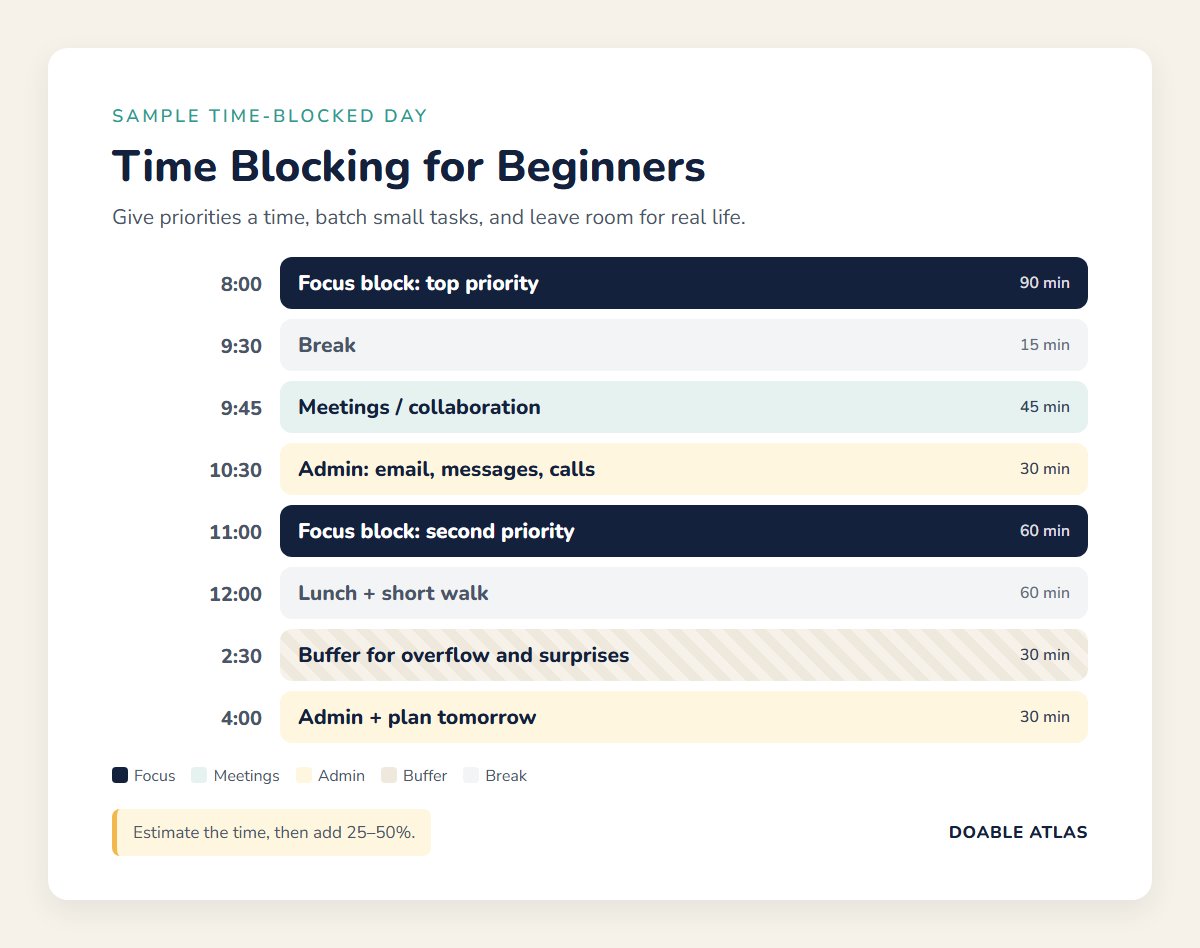
- 7:30–8:00: Morning routine and a quick look at the day’s blocks
- 8:00–9:30: Focus block: most important task of the day
- 9:30–9:45: Break
- 9:45–10:30: Meetings or collaborative work
- 10:30–11:00: Admin block: email, messages, quick calls
- 11:00–12:00: Focus block: second priority
- 12:00–1:00: Lunch and a short walk
- 1:00–2:30: Meetings or project work
- 2:30–3:00: Buffer block for overflow and surprises
- 3:00–4:00: Focus block or lighter tasks, depending on energy
- 4:00–4:30: Admin block and plan tomorrow
- Evening: One personal block, such as exercise, a hobby, or a household task
Notice that not every minute is assigned to deep work. Breaks, buffers, and admin blocks are what make the plan survivable.
Planning your first time-blocked week
Planning one day at a time works, but a quick weekly plan makes time blocking much easier. Here is how a beginner might lay out a first week. Spend about 20 to 30 minutes on Sunday evening or Monday morning:
- Review last week: Note anything unfinished and any deadlines coming up.
- Place fixed events: Meetings, appointments, classes, and family commitments go on the calendar first.
- Choose three weekly priorities: For example, finish a client proposal, complete a training module, and plan a family trip.
- Give each priority two or three blocks: Spread them across the week rather than relying on one long session.
- Add daily admin blocks: Two short blocks per day for email and small tasks.
- Protect personal time: Add exercise, meals, and at least one block of genuine rest.
- Leave one open afternoon: A larger buffer, often Friday afternoon, catches everything that slipped.
A sample week might look like this: Monday and Wednesday mornings for the proposal, Tuesday and Thursday mornings for the training module, Wednesday evening for trip planning, and Friday afternoon as a catch-up buffer. Meetings and admin fill the gaps around those protected blocks.
Many people find it helpful to pair this weekly plan with a short reset routine. Our weekly reset checklist walks through a simple way to review and prepare.
How to protect your time blocks
A block on the calendar only helps if you can keep it. This is where many people new to time blocking struggle, so these habits are worth adopting early. They make time blocks harder to break:
- Treat focus blocks like meetings: If someone asks for that time, offer another slot, just as you would for an existing appointment.
- Make blocks visible to others: On a shared work calendar, label focus blocks clearly, for example “Focus: proposal draft,” so colleagues are less likely to book over them.
- Silence notifications during focus blocks: Use your phone’s focus mode and close email and chat until the block ends.
- Prepare before the block starts: Open the document, gather notes, and fill your water glass so the first minutes go to real work.
- End with a next step: Before a block finishes, write down exactly where to restart. That makes the next block faster to begin.
You will not protect every block every time, and that is fine. The goal is to protect more of your important time than you did before.
Time blocking tools
You do not need special software. Common options include:
- Digital calendars: Google Calendar, Outlook, and Apple Calendar all let you create color-coded blocks and set reminders.
- Paper planners: A daily planner with hourly lines works well if you like writing things down and want fewer screens.
- A printed grid: A simple weekly grid on your desk or fridge is enough to start.
Color coding helps you see the balance of your week at a glance. For example, use one color for focus work, one for meetings, one for admin, and one for personal time.
Common time blocking mistakes
Over-scheduling every minute
A calendar with no breathing room is fragile. One late meeting pushes every block back, and the whole plan collapses. Leave buffers and accept that some blocks will move.
Blocks that are too vague
“Work on project” is easy to drift through. A specific block, such as “Write the introduction and outline section 2,” gives you a clear starting point and finish line.
Ignoring your energy
Scheduling your hardest work for the time you are usually tired sets you up to fail. Match demanding tasks to your best hours and routine tasks to lower-energy times.
Abandoning the plan after one bad day
Every time-blocker has days that fall apart. The skill is adjusting, not achieving a perfect record. Move what did not get done, learn from it, and try again tomorrow.
Forgetting personal time
If your calendar only contains work, rest and relationships get whatever is left over. Blocking time for exercise, family, and hobbies helps protect them, too.
Adapting time blocking to real life
If your schedule is unpredictable
Use fewer, flexible blocks. Instead of planning every hour, block one or two protected focus periods per day and leave the rest open. Even one protected block can make a big difference.
If you are a parent or caregiver
Plan around natural windows, such as nap time, school hours, or after bedtime. Shorter blocks of 20 to 45 minutes are often more realistic, and theme-based days can help when tasks vary widely.
If you work in a reactive job
Block time for the reactive work itself, such as a “support queue” block, and protect a smaller focus block early in the day before requests start arriving.
If you procrastinate on big tasks
Start with very short blocks for the task you are avoiding, for example 25 minutes, and define a tiny first step for each one. Our guide on how to stop procrastinating has more ideas for getting started.
Frequently asked questions
How long should a time block be?
For focused work, many beginners do well with 60 to 90 minutes. Admin blocks are often 20 to 30 minutes. If you struggle to concentrate, start shorter and lengthen your blocks over time.
Should I time block every day?
Most people benefit from planning weekdays, at least for their most important tasks. Some like to keep weekends loosely planned. Try a full week first, then adjust to what feels sustainable.
What if something urgent comes up?
Use your buffer block or move a lower-priority block. The goal is not to refuse every interruption but to make conscious trade-offs instead of letting your day be decided for you.
Is time blocking the same as the Pomodoro Technique?
No, but they work well together. Time blocking decides what you work on and when. The Pomodoro Technique is a way of working inside a block, using short focused intervals with breaks.
Your next step
Time blocking for beginners does not require a perfect calendar or a new app. This week, add your fixed commitments, choose three priorities, and give each one a specific 60- to 90-minute block during your best hours. Add an admin block, a buffer, and five minutes each evening to adjust.
After one week, look back at which blocks held and which did not. Keep what worked, change what did not, and let your schedule become a tool that protects the things that matter most to you.