

Software, music, cars, razors, even printer ink: more and more things that used to be bought once are now sold as a monthly plan. Sometimes that is a great deal. Sometimes it quietly costs you far more over a few years. The subscription vs one time purchase decision comes down to a few simple numbers and a few honest questions about how you will actually use the product.
This guide gives you a clear way to compare the two models: a break-even formula you can do on your phone, worked examples, a side-by-side table of pros and cons, the hidden costs on both sides, and a checklist to use before you click “subscribe” or “buy now.”
In this guide
Subscription vs one time purchase: the basic difference
A one-time purchase means you pay once and own the product or a permanent license to use it. You might pay extra later for upgrades, repairs, or new versions, but nothing is billed automatically.
A subscription means you pay a recurring fee, usually monthly or yearly, for continued access. When you stop paying, access usually ends. In return, you often get updates, support, cloud features, or new content as part of the price.
Neither model is automatically better. Each shifts costs and risks in a different direction:
- With a one-time purchase, you take on a higher upfront cost and the risk that the product becomes outdated.
- With a subscription, you take on a never-ending cost and the risk that prices rise or the service changes.
The break-even formula
The most useful tool for any subscription vs one time purchase comparison is the break-even point: how long until the subscription has cost you as much as buying outright.
Break-even (in months) = one-time price ÷ monthly subscription price
If you plan to use the product for less time than the break-even point, the subscription is usually cheaper. If you plan to use it for longer, buying is usually cheaper.
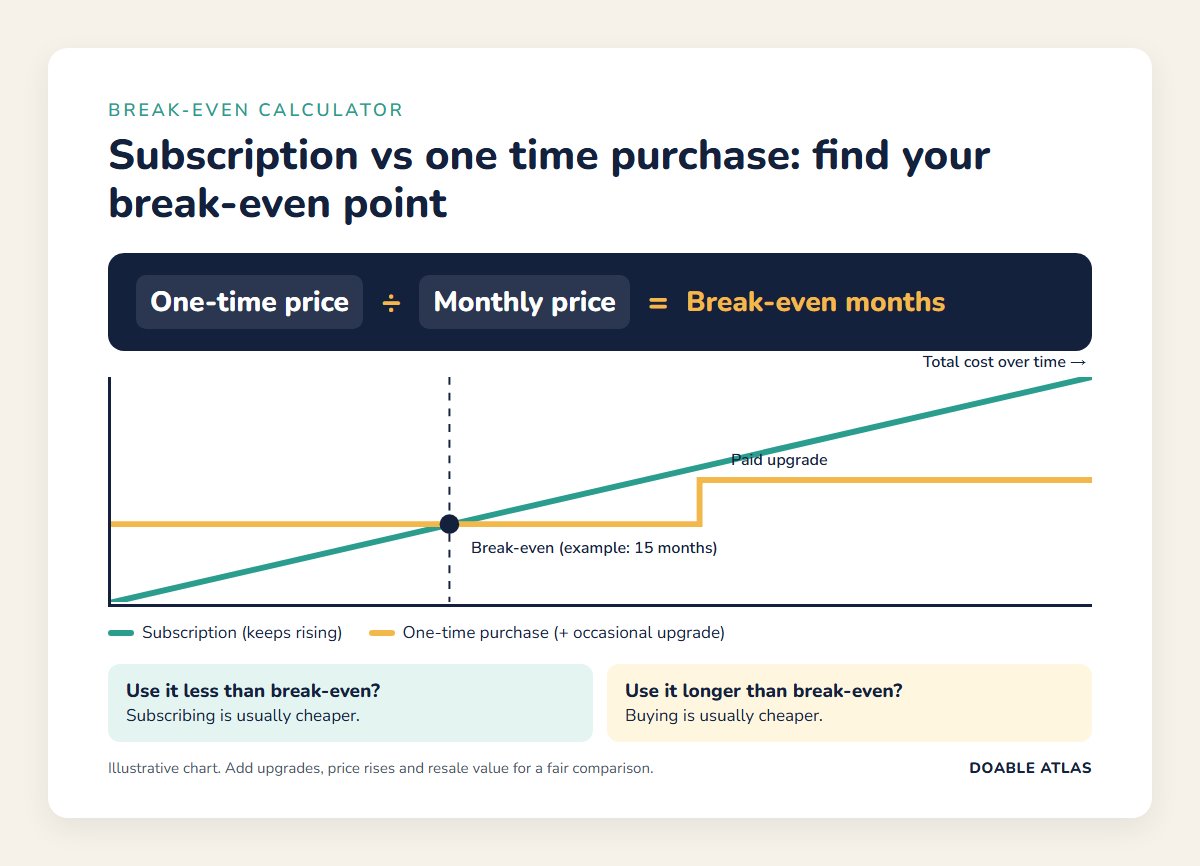
For a fair comparison, adjust the formula for real-world extras:
- Add the cost of upgrades to the one-time price if you would need to buy a new version every few years to keep it working.
- Use the yearly plan price if you would pay annually. Annual plans are often discounted compared with paying monthly.
- Include price increases. Subscription prices tend to rise over time. If you are not sure, add a cushion of 5 to 10 percent per year to stay realistic.
- Subtract resale value from the one-time price if you could sell the item later, such as a camera, game console, or tool.
Worked examples
The numbers below are illustrative examples, not quotes for specific products. Plug in real prices from the products you are considering.
Example 1: Photo editing software
- One-time license: $150, with a major paid upgrade of about $80 every three years.
- Subscription: $10 per month, including all updates.
Simple break-even: $150 ÷ $10 = 15 months. Over five years, the one-time route costs about $150 + $80 = $230, while the subscription costs about $600 before any price increases. If you edit photos regularly for years, buying wins by a wide margin. If you need the software for a single three-month project, the subscription costs about $30 and is the clear winner.
Example 2: A meal kit vs a kitchen gadget
Not every comparison is software. Imagine you want to cook more at home. You could subscribe to a recipe app with weekly meal plans for $6 a month, or buy a $90 cookbook-and-planner set once. Break-even: $90 ÷ $6 = 15 months. If you only want help getting started for a few months, the subscription makes sense. If you plan to cook from the same system for years, buying is cheaper.
Example 3: Music and video streaming
Streaming services are a case where the subscription vs one time purchase math often favors subscribing, because buying the same library outright would cost far more. A $11 monthly music plan costs $132 a year. Buying even 10 to 12 albums a year at typical prices could cost a similar amount for a tiny fraction of the catalog. The trade-off is that you own nothing when you cancel. If there are a few albums or films you return to constantly, buying those specific titles can still make sense.
Pros and cons side by side
| Factor | Subscription | One-time purchase |
|---|---|---|
| Upfront cost | Low | High |
| Long-term cost | Keeps growing; often higher after break-even | Fixed, plus optional upgrades |
| Updates and support | Usually included | Limited or paid |
| Ownership | Access ends when you stop paying | You keep what you bought |
| Flexibility | Easy to try, pause, or switch | Committed once you buy (subject to returns) |
| Price risk | Prices can rise; features can change | Price locked at purchase |
| Budget impact | Small, predictable, but easy to forget | One larger hit, then done |
When a subscription makes more sense
Subscriptions are often the better choice when:
- You need it short term. A project, a semester, a trial run, or a seasonal hobby.
- The content keeps changing. Streaming libraries, news, online courses, and services that add new material regularly.
- Updates matter. Security software, tax software, and tools that must stay compatible with new devices or regulations.
- The upfront cost is a real barrier. Spreading costs out can make an important tool affordable, as long as you budget for it.
- You want to test before committing. A month or two of subscribing can tell you whether a product is worth buying outright later.
- Cloud features are central. Syncing across devices, collaboration, and online storage usually require ongoing service.
When a one-time purchase makes more sense
Buying outright is often the better choice when:
- You will use it for years. If your expected use is well past the break-even point, buying almost always wins.
- The product is stable. Tools that do one job well and do not need constant updates, such as a simple writing app, a power drill, or a reference book.
- You value ownership. You want to keep access even if the company changes its plans, raises prices, or shuts down.
- You can resell it. Physical products and some licenses keep value you can recover later.
- You tend to forget subscriptions. If small recurring charges slip past you, a single purchase protects your budget.
Hidden costs to watch on both sides
Subscription hidden costs
- Subscription creep: several small plans add up. Five $10 services equal $600 a year.
- Price increases: many services raise prices after you sign up, sometimes with little fanfare.
- Free trial traps: trials that convert to paid plans automatically if you forget to cancel. The Federal Trade Commission advises reading the terms first, including how long the trial lasts and how to cancel, and watching for pre-checked boxes that allow ongoing charges (FTC). Set a reminder the day you start.
- Tiered features: the plan you need may cost more than the advertised starting price.
- Hard cancellations: some services make cancelling slow or confusing. Check how to cancel before you subscribe.
One-time purchase hidden costs
- Paid upgrades: a new version every few years can make “one-time” a recurring cost after all.
- Compatibility issues: older software may stop working with new operating systems or devices.
- Limited support: help and bug fixes may end after a set period.
- Accessories and consumables: a cheap printer with expensive ink, or a device that needs proprietary parts.
- Maintenance and repairs: physical products wear out. Factor in likely repair costs, and think carefully about whether an extended warranty is worth it.
Think in total cost of ownership
The fairest way to compare is to estimate the total cost of ownership over the time you expect to use something. Add up everything you will pay over that period:
- Upfront price or first-year subscription cost
- Recurring fees, including expected price increases
- Upgrades, add-ons, and accessories
- Maintenance, repairs, or support fees
- Minus any resale value at the end
Then divide by the number of months or years of use to get a cost per month you can compare directly. This approach works for software, appliances, vehicles, and almost any big purchase. It also helps you spot when a cheap upfront price hides expensive ongoing costs, a pattern that also shows up when product reviews focus only on day-one impressions.
How to audit the subscriptions you already have
Before adding anything new, it is worth checking what you already pay for. Many people find at least one forgotten subscription the first time they look. Try this 20-minute audit:
- List every recurring charge. Check two to three months of bank and card statements, your phone’s app store subscriptions, and your email for receipts.
- Write the yearly cost next to each one. Monthly fees look small; yearly totals tell the truth.
- Mark how often you used it last month: often, sometimes, or never.
- Cancel or downgrade the “never” items today. For “sometimes” items, consider pausing, rotating services, or switching to a cheaper tier.
- Set a calendar reminder to repeat the audit every three to six months.
Rotating services is especially effective for streaming. Subscribe to one service for a month or two, watch what you want, then cancel and switch to another. You get variety without paying for everything at once. If keeping track of tasks like this is hard, our guide on time blocking for beginners shows how to schedule small admin jobs so they actually happen, and our digital declutter checklist helps you clean up apps and accounts you no longer use.
Hybrid options: the middle ground
The choice is not always strictly one or the other. Many products now offer hybrid models that can give you the best of both:
- Lifetime licenses: some apps sell a one-time “lifetime” plan alongside their subscription. Run the break-even math, and consider how likely the company is to be around for years.
- Perpetual fallback licenses: a few software makers let you keep the last version you paid for if you stop subscribing. You lose future updates but keep working.
- Rent-to-own and financing: spreading the cost of a physical product over months, with ownership at the end. Check the total paid, including interest or fees, against the cash price.
- Freemium plans: a free basic tier with paid upgrades. Many people find the free version covers everything they need.
- Pay-per-use: buying individual items, such as a single movie rental or one-off design template, instead of a full plan. Ideal for occasional needs.
- Shared or family plans: splitting a subscription with your household, where the terms allow it, can cut the per-person cost dramatically.
When a hybrid option exists, compare all three numbers: the monthly cost, the one-time or lifetime cost, and the cost of the free or pay-per-use route. The cheapest choice is often the one people do not think to check.
Common mistakes to avoid
Even careful shoppers fall into a few predictable traps when weighing a subscription vs one time purchase:
- Overestimating future use. We tend to imagine our most motivated selves. If you have bought gym memberships or language apps you barely used, factor that in.
- Comparing the monthly price to the full purchase price. “$10 a month” vs “$150” sounds like an easy win for the subscription until you remember it is $120 every year.
- Ignoring what you already own. The software or tool you bought years ago may still do the job perfectly well.
- Forgetting about data lock-in. If your files, playlists, or progress live inside a service, switching later can be painful. Check whether you can export your data.
- Letting a discount make the decision. A great introductory price only matters if the regular price is also worth it.
A quick decision checklist
Before choosing between a subscription vs one time purchase, run through these questions:
- How long will I realistically use this? Be honest, not optimistic.
- What is the break-even point? One-time price divided by monthly price.
- Will I need updates, support, or new content? If yes, the subscription may include real value.
- What happens when I stop paying? Do I lose my files, progress, or access?
- Is there a cheaper tier, annual discount, or free alternative?
- How easy is it to cancel? Check before signing up.
- Can I afford the upfront cost without strain? If not, a subscription might be the more responsible choice for now.
- Am I buying because of a deadline or discount pressure? Countdown timers and “limited offers” are designed to rush decisions. Sleeping on it rarely costs you.
The psychology behind subscriptions
Subscriptions are popular with companies partly because they work with human psychology. A small monthly price feels less painful than a large one-time cost, even when the total is higher. Automatic renewals rely on inertia: once you are signed up, staying subscribed takes no effort, while cancelling takes a decision. And free trials take advantage of the fact that people tend to overestimate how likely they are to remember to cancel.
None of this means subscriptions are bad. It just means the default should be a conscious choice rather than an automatic one. Translating monthly prices into yearly totals and setting cancellation reminders are two simple habits that put you back in control. If you notice you tend to agonize over these choices, our article on why people overthink has tips for making decisions without getting stuck.
Frequently asked questions
Is a subscription or one-time purchase cheaper?
It depends on how long you use the product. Divide the one-time price by the monthly subscription price to find the break-even point in months. Use it for less time than that and the subscription is usually cheaper; use it longer and buying usually wins.
Why are so many companies switching to subscriptions?
Subscriptions give companies predictable recurring revenue and an ongoing relationship with customers. For users, they can lower upfront costs and include updates, but they also tend to cost more over long periods.
Are annual subscriptions better than monthly?
Annual plans are often discounted compared with paying monthly, so they can save money if you are confident you will use the service all year. Monthly plans offer more flexibility if you are unsure.
How do I avoid forgetting to cancel a free trial?
Set a calendar reminder a day or two before the trial ends as soon as you sign up. Some people cancel immediately after starting a trial, since many services let you keep access until the trial period finishes. Check the terms first.
What is a good rule of thumb for subscription vs one time purchase decisions?
If you will use something for longer than its break-even point and it does not need constant updates, buying is usually the smarter choice. If you need it briefly, want constant new content, or rely on updates and cloud features, subscribing often makes more sense.
Your next step
The subscription vs one time purchase question does not have a single right answer, but it does have a simple method. Find the break-even point, estimate how long you will really use the product, and add the hidden costs on both sides. That takes about five minutes and can save hundreds of dollars a year.
Start today with one quick win: open your bank or card statement, list your recurring charges, and cancel one subscription you no longer use. Then use the checklist above the next time a “just $9.99 a month” offer appears.